Food Delivery App Mobile UI KIT: A Comprehensive Guide
In today's fast-paced world, food delivery apps have become an essential part of daily life. Whether you're a busy professional, a student, or a parent, these apps offer convenience, variety, and efficiency. However, building a successful food delivery app requires more than just a great idea—it demands a user-friendly interface that enhances the overall experience. This is where the Food Delivery App Mobile UI KIT comes into play.
What Is a Food Delivery App Mobile UI KIT?
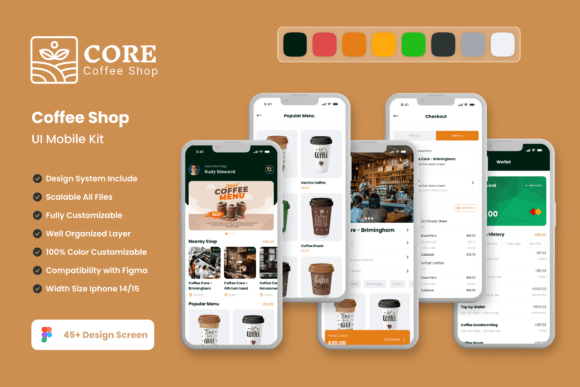
A Food Delivery App Mobile UI KIT is a collection of pre-designed screens and elements that developers and designers can use to build mobile applications quickly and efficiently. It provides a foundation for creating visually appealing and functional interfaces without starting from scratch. The kit typically includes a variety of templates, icons, color schemes, and other design assets that can be customized to fit specific needs.
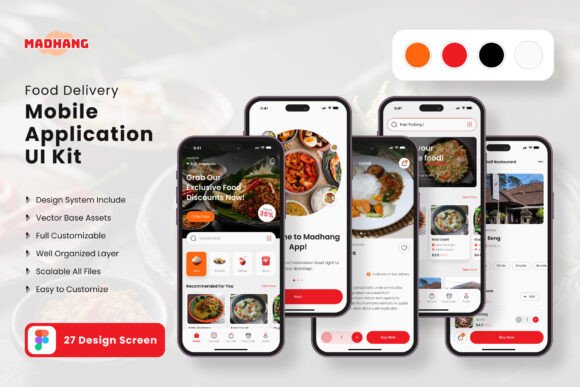
The Food Delivery App Mobile UI KIT consists of 27 high-quality templates, making it one of the most comprehensive resources available for app development. These templates cover all the essential screens needed for a food delivery app, such as the home screen, product listings, checkout process, user profile, and more. By using this kit, developers can save time and effort while ensuring a consistent and professional look across the entire application.
Why Use a Food Delivery App Mobile UI KIT?
There are several reasons why using a UI KIT like this is beneficial for both new and experienced developers:
- Saves Time and Effort: Instead of designing each screen from scratch, developers can use the pre-built templates to speed up the development process.
- Ensures Consistency: A UI KIT helps maintain a cohesive design throughout the app, which improves user experience and brand recognition.
- Offers Flexibility: The templates are fully editable, allowing developers to add or remove elements based on their specific requirements.
- Supports Customization: The kit is designed to be customizable in Figma, making it easy to adjust colors, fonts, and other design elements.
Additionally, the Food Delivery App Mobile UI KIT includes 80 UI elements, 100 vector layers, and 100 scalable vectors, providing a rich set of tools for creating detailed and interactive interfaces. The inclusion of symbol objects and fully layered designs ensures that the kit is not only visually appealing but also technically sound.
Key Features of the Food Delivery App Mobile UI KIT
The Food Delivery App Mobile UI KIT offers a range of features that make it a valuable resource for app developers:
- 27 Pixel-Perfect Screen Designs: Each screen is designed with precision to ensure a high-quality user experience.
- 80 UI Elements: These elements include buttons, forms, icons, and other interactive components that enhance the app's functionality.
- 100 Vector Layers: The use of vector layers allows for scalability and clarity at any size.
- Free Font: A custom font is included to give the app a unique and professional look.
- Available for Figma: The kit is compatible with Figma, making it easy to edit and customize.
- 100 Scalable Vectors: These vectors can be resized without losing quality, ensuring a consistent visual experience across different devices.
- Symbol Objects: These objects allow for efficient reuse of design elements, streamlining the development process.
- Fully Layered: The design files are organized into layers, making it easier to modify individual components.
- Free Icon Vector: A set of icons is provided to enhance the visual appeal of the app.
- Easy to Change Color Style: Developers can easily adjust the color scheme to match their brand identity.
All images included in the kit are for preview purposes only and are not included in the download files. This ensures that users can focus on the design elements without being distracted by actual content.
How Does the Food Delivery App Mobile UI KIT Fit Into Modern Life?
With the rise of digital platforms, food delivery apps have become a staple in many people's lives. They provide a convenient way to order meals from restaurants, saving time and effort. However, the success of these apps depends largely on their user interface. A well-designed app can significantly improve user engagement and satisfaction.
The Food Delivery App Mobile UI KIT plays a crucial role in this context. By offering a wide range of pre-designed templates, it enables developers to create apps that are not only functional but also visually appealing. This is particularly important in a competitive market where users have high expectations for app performance and aesthetics.
Moreover, the flexibility of the kit allows developers to tailor the app to specific target audiences. For example, a restaurant chain might want a more vibrant and colorful interface, while a health-focused app might prefer a minimalist and clean design. The ability to customize the UI ensures that the app can meet the unique needs of its users.
Practical Relevance and Use Cases
The Food Delivery App Mobile UI KIT is not just a tool for developers; it has practical relevance in various industries and scenarios. Here are a few examples:
- Startups: Startups looking to launch a food delivery app can use the kit to create a professional-looking prototype quickly.
- Freelancers: Freelance designers and developers can use the kit to deliver high-quality projects to clients without spending excessive time on design work.
- Businesses: Established businesses looking to expand their online presence can use the kit to develop a mobile app that complements their existing services.
- Students and Educators: Students learning about app development can use the kit to gain hands-on experience with real-world design principles.
By leveraging the Food Delivery App Mobile UI KIT, individuals and organizations can streamline the app development process and focus on other aspects of their business, such as marketing, customer service, and logistics.
Common Misconceptions About UI KITS
Despite their benefits, there are some common misconceptions about UI KITS that users should be aware of:
- Misconception 1: UI KITS Are Not Customizable: While UI KITS provide a foundation, they are designed to be highly customizable. Users can modify elements to suit their specific needs.
- Misconception 2: UI KITS Limit Creativity: On the contrary, UI KITS can actually enhance creativity by providing a structured framework that allows for experimentation and innovation.
- Misconception 3: UI KITS Are Only for Beginners: While UI KITS are useful for beginners, they are also valuable for experienced developers who want to save time and maintain consistency.
Understanding these misconceptions can help users make the most of the Food Delivery App Mobile UI KIT and avoid unnecessary frustrations during the development process.
Conclusion
The Food Delivery App Mobile UI KIT is a powerful tool that simplifies the app development process while ensuring a high-quality user experience. With its 27 pixel-perfect screen designs, 80 UI elements, and 100 vector layers, it provides everything needed to create a modern and functional food delivery app. Whether you're a developer, designer, or entrepreneur, this kit offers a valuable resource for building a successful mobile application.
By using the Food Delivery App Mobile UI KIT, you can save time, maintain consistency, and focus on the unique aspects of your app. As the demand for food delivery services continues to grow, having a well-designed app is more important than ever. With this kit, you're well-equipped to meet the challenges of the digital marketplace and deliver a seamless experience to your users.